TL;DR
I built DAF Online, a free, browser-based tool for speech therapy that helps people who stutter and Parkinson’s patients find fluency. While native apps and $1000 hardware exist, I used the Web Audio API to achieve sub-6ms latency in the browser by aggressively optimizing the audio graph.
What is Delayed Auditory Feedback?
Delayed Auditory Feedback (DAF) is simple: you hear your own voice played back with a short delay. What’s less obvious is what that tiny lag does to your brain.
For people who stutter, speaking while hearing a slightly delayed version of your own voice can induce near-instant fluency. It’s called the Chorus Effect. Your brain perceives a second speaker and shifts into a different, more fluid processing mode. The same principle is used by speech-language pathologists (SLPs) for Parkinson’s patients, where the delay acts as a natural “speed limit,” forcing slower, more deliberate speech.
The tool has three core audiences: people who stutter, individuals with Parkinson’s Disease, and SLPs running remote telehealth sessions who need a quick, zero-friction way to get a patient practicing from home.
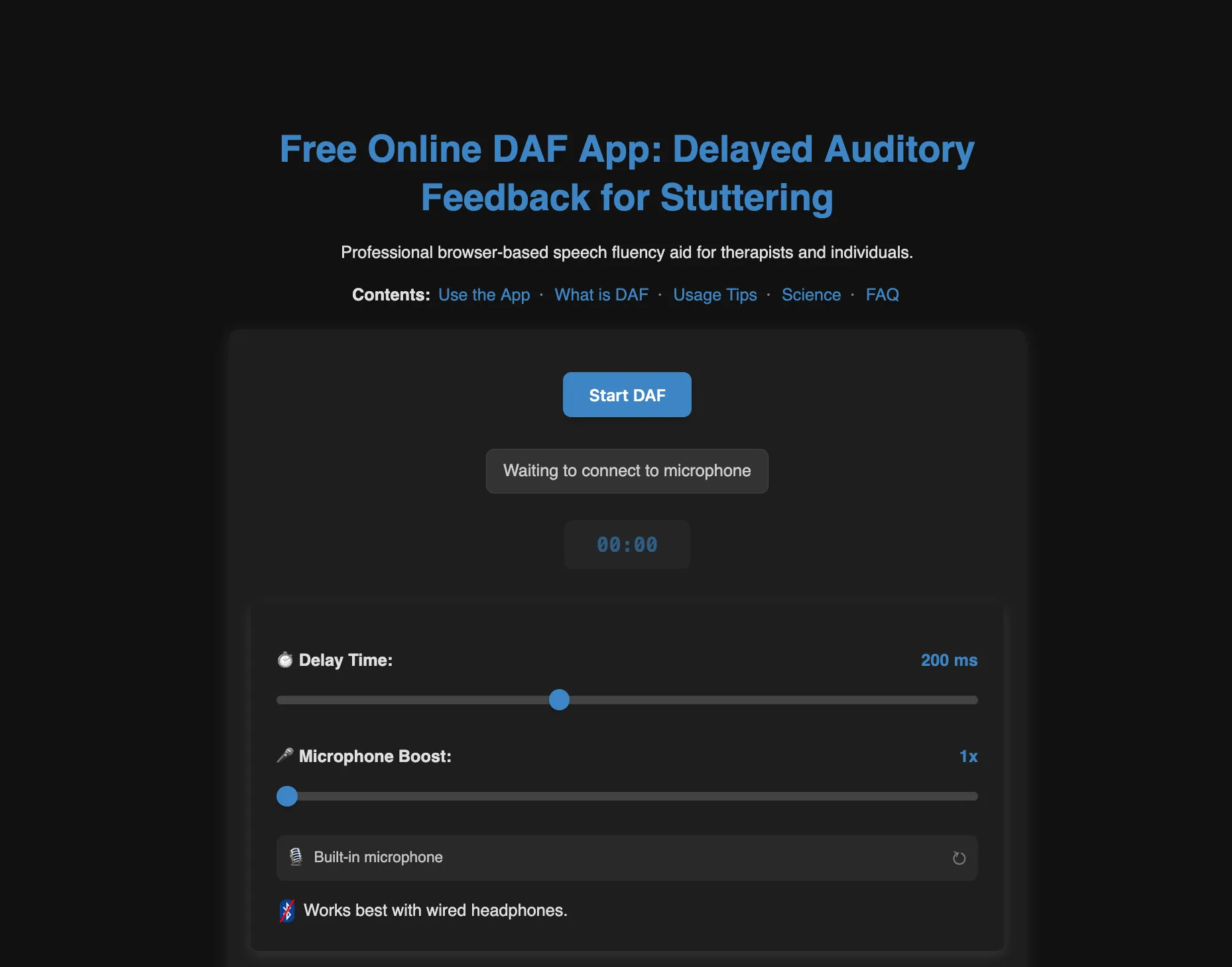
The Landscape Before I Built This (Early 2025)
When I went looking for a free, browser-based DAF tool, I found: nothing that actually worked.
The market looked roughly like this:
- Dedicated hardware (e.g., Casa Futuro, SpeechEasy): $1000-$2500+. Clinically validated, but you need to order, wait, and pay.
- Native mobile apps (e.g., DAF Pro): A handful exist on iOS and Android. Some are free-tier, most push you toward a subscription. They work reasonably well on modern phones.
- Web-based pages: The few I found were marketing funnels pointing back to the native apps, or had limited functionality, or long delays. No one had built an actual working web implementation you could just… open and use.
- The “Developer Gap”: I found a few GitHub repositories that implemented DAF logic. Some used the Web Audio API, while others were native C++ or Python implementations. Their problem was that they weren’t hosted. Just code sitting in a repo.
The implementation isn’t complex. The Web Audio API has had a DelayNode for years. The gap wasn’t technical; nobody had simply bothered to close it.
The Math: What’s Actually Happening
The feedback loop is simple. The output signal is the input signal shifted in time:
Where:
- : The signal the user hears at time
- : The user’s voice entering the microphone
- : Intentional Lag is the delay you dial in
- : System Floor is the device lag. the hidden hardware/OS latency floor
- : Gain (volume)
Then the effective delay is the sum of the intentional lag and the device lag:
The variable most people ignore is . It’s not zero. And if it’s high, your “50ms delay” is actually 100ms, which is a qualitatively different therapeutic experience and potentially useless.
Why Latency Is the Whole Game
For DAF to work therapeutically, the internal device latency needs to stay under 15-20ms. That is the time your hardware and software spend processing audio before your intentional delay is added.
Here’s why it matters: if is already 50ms and you set a 50ms intentional delay, the user hears a 100ms echo. Worse, high internal latency usually comes with jitter (timing variance), which breaks the chorus effect entirely. Jitter makes the delay feel unstable. The brain doesn’t settle into choral mode, it just gets confused.
The Latency Landscape by Device
| Setup | Typical Internal Latency | Verdict |
|---|---|---|
| Dedicated PC Drivers/Hardware | 1 - 9ms | Excellent |
| Dedicated DAF Hardware | < 10 ms | Excellent |
| High-End PC + Chrome | 6 - 10 ms | Excellent |
| iPhone 16 + Safari | 13 ms | Good |
| aptX Low Latency codec (Bluetooth) | 40 ms | Borderline |
| AAC codec (Bluetooth) | 100 - 200 ms | Unusable |
| SBC codec (Bluetooth) | 150 - 250 ms | Unusable |
: My implementation.
This is why native apps have historically had an edge over web tools. iOS and Android give native audio code direct access to the hardware buffer. The browser sits a layer above that but with the right flags, you can close most of the gap.
How to Test Your Own Floor
Set the software delay to 0 ms. Speak a sharp “P” or “K” sound. If it sounds like one sound, your floor is likely under 15ms. If it sounds like a double-hit or a slap-back echo, your internal latency is above 30ms and you should switch to a wired headset or a better audio driver before using the tool therapeutically.
Bluetooth headphones are incompatible with DAF therapy. Their 150-250ms hardware latency dwarfs any intentional delay you’d set, making the total delay unpredictable and therapeutically ineffective. Always use wired headphones.
How It’s Built for Speed
To be a legitimate alternative to dedicated hardware, the implementation needed to minimize as aggressively as possible. Three things matter most.
1. Minimal Audio Graph Topology
Every node in the Web Audio API graph adds overhead. The final implementation uses a lean, four-node linear chain. No branches, no unnecessary processing.
// Minimal 2-hop topology for maximum performance
_connectAudioNodes() {
    const nodes = this.audioNodes;

    // source (Mic) -> delay (DAF) -> gain (Vol) -> destination (Output)
    nodes.source.connect(nodes.delayNode);
    nodes.delayNode.connect(nodes.gainNode);
    nodes.gainNode.connect(this.audioContext.destination);
}
2. Requesting Hardware-Level Latency
Browsers default to an “interactive” latency mode (~50ms buffer). Setting latencyHint: 0 tells the browser to request the minimum buffer size the hardware allows. Matching the native device sample rate eliminates resampling lag.
_createAudioContext() {
    const contextOptions = {
        // Request absolute minimum buffer size from hardware
        latencyHint: 0,
    };

    // Match native hardware sample rate to bypass resampling lag
    if (this.deviceSampleRate) {
        contextOptions.sampleRate = this.deviceSampleRate;
    }

    this.audioContext = new (window.AudioContext || window.webkitAudioContext)(contextOptions);
}
3. Honest Latency Measurement
The tool reads baseLatency and outputLatency directly from the AudioContext and adds them to the display so the user always sees their effective delay, not just the slider value.
// Measuring the true hardware "floor"
const outputMs = (this.audioContext.baseLatency + (this.audioContext.outputLatency || 0)) * 1000;
this.measuredFloorMs = outputMs;

// UI shows both the target and the honest effective delay
const effective = Math.round(targetDelay + measuredFloorMs);
this.displayLabel = `${targetDelay} ms (~${effective} ms effective)`;
This matters for trust. A user who sees “50ms (est. 56ms effective)” understands their setup. A user who sees “50ms” and hears 100ms thinks the tool is broken.
Frequency Altered Feedback (FAF)
I havent gotten around implementing FAF yet, but its also used in speech therapy. Instead of delaying the signal, it shifts the pitch up or down. The effect is similar: it disrupts the brain’s normal feedback loop and can improve fluency for some users. It’s on the roadmap for a future update, but DAF was the priority since it’s more widely used and has a clearer latency requirement.
Implementing FAF is a challenge because it requires buffering audio to analyze and shift the frequency content. The buffering means added latency, which can break the therapeutic effect if it exceeds the 15-20ms threshold. More on that in the deep dive below.
◈ FAF Algorithms and the Buffer Tax ↓
FAF shifts your voice up or down in pitch rather than delaying it. The therapeutic mechanism is similar, but the implementation is messier.
The problem is that you can’t shift pitch without first buffering a chunk of audio to analyze. A simple delay line just holds samples and replays them. Pitch shifting has to look at a window of the signal before it can do anything, which means latency before your intentional delay is even added.
At 44.1 kHz, the relationship is straightforward:
| Buffer Size (Samples) | Latency Added (at 44.1kHz) | Therapeutic Verdict |
|---|---|---|
| 128 | ~2.9 ms | Fine |
| 256 | ~5.8 ms | Fine |
| 512 | ~11.6 ms | Borderline |
| 1024 | ~23.2 ms | Already over the threshold |
Why you can’t skip the buffer
The naive fix is sample-by-sample processing: shift pitch like a sped-up record. That works for about half a second until the playback outruns the input and you get a gap. To keep the feedback in sync with actual speech rate, you need time-domain splicing (SOLA): small grains of audio, cross-faded together. That requires an AudioWorklet and a minimum window size.
Phase vocoders vs. granular synthesis
Phase vocoders do this better perceptually. They use FFTs to shift pitch cleanly with no metallic artifacts. The catch is they need large buffers for frequency resolution, typically 1024 samples or more, which puts you at 23ms of algorithmic latency before anything else. That’s already past the cutoff.
Granular synthesis sounds rougher, but it runs on 128 or 256 samples. For this use case, a slightly robotic voice at 10ms beats a natural-sounding one at 40ms.
SEO: Why the Body Text Is Long (On Purpose)
“Delayed Auditory Feedback” is an incredibly niche topic. If you compare it to a broader term like “Stuttering” in Google Trends, you can see how small the specific search market is for the tool itself compared to the condition it treats.
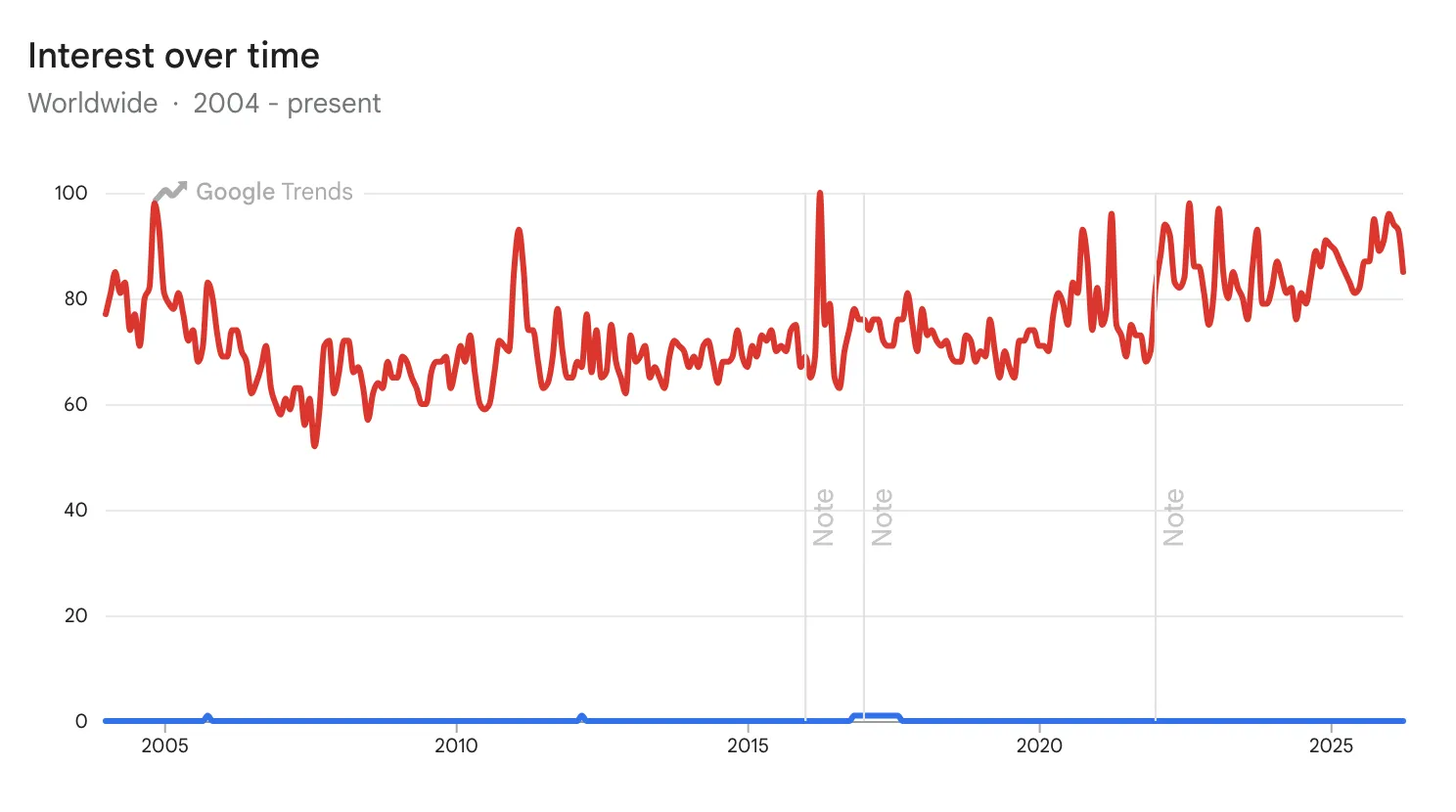
Building the tool was the easy part. Getting it in front of people who need it took just as long.
Most users arrive via high-intent functional queries. They know what a DAF tool is. They just need to find one that works. A minimal landing page with a slider and a button would rank for nothing. In the first months, the tool was invisible to these high-intent users, stalled at 11th-15th in the rankings while hardware retailers and native apps claimed the top spots.
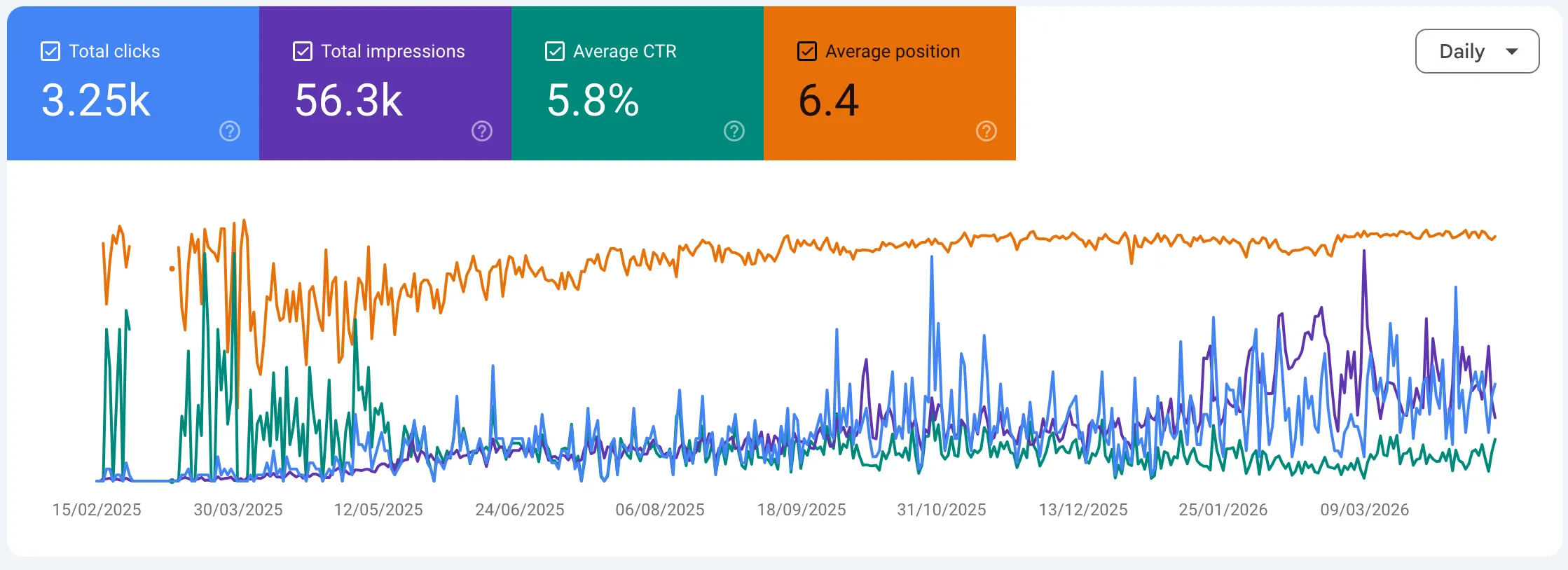
By writing thorough, accurate content about the science and the use cases, the site achieved a 2.4 weighted average position for core keywords, capturing 85% of organic traffic from the top 3 results with a 75% CTR on primary search intent (Feb 2026).
Fun Fact: As it turns out, “DAF” is a congested acronym dominated by Dutch heavy-duty truck manufacturer DAF Trucks N.V. If you search “DAF” without context, Google assumes you’re looking for a 7.5-ton hauler, not a speech aid.
Conclusion
With the right initialization flags and a minimal graph topology, a browser-based DAF tool can match native app latency on decent hardware, with no install, no account, and no payment required.
The gap wasn’t a hard engineering problem; it was just an ignored one. Speech therapy is a small market, and most developers aren’t building for people who stutter or have Parkinson’s. Which is why it was worth doing.
If you want to look at the implementation or try the tool yourself: